Data Quality
Tuva Data Quality helps you determine whether healthcare data has been mapped correctly to the Tuva Input Layer and identify problems in the mapped data.
Data Quality runs as transparent dbt models inside your warehouse. It evaluates the data after a connector maps it to the Input Layer; it does not connect to or profile source systems directly.
Our Philosophy
There is no such thing as perfect data quality in healthcare. Every healthcare dataset has issues. Values are missing, codes are invalid, relationships are incomplete, records conflict, and source systems capture the same clinical or administrative event in different ways.
Tuva evaluates those issues through two complementary types of Data Quality:
- Structural Data Quality verifies that the connector implemented each enabled Input Layer Model correctly.
- Logical Data Quality identifies records whose values or relationships do not meet Tuva's expectations for analytically usable healthcare data.
Structural Data Quality runs first. After dbt successfully resolves and builds the enabled connector models and Tuva Core Input Layer Wrappers, structural checks verify required columns, compatible data types, source populations, and primary keys. Every structural result must pass before Logical Data Quality or downstream Tuva models can be trusted.
Logical Data Quality then evaluates hundreds of named healthcare-data
expectations. Results use three severity levels, S1, S2, and S3, and evaluate
every data_source independently. Users can aggregate results across tests,
drill into an individual failure, retrieve the affected keys, and join those
keys back to the Input Layer records that produced the issue.
For dates and timestamps, Structural Data Quality verifies the native warehouse
type. Logical Data Quality then applies exactly one S2 invalid range check to
each of the 72 temporal Input Layer fields. Bounds follow field semantics:
historical person and condition dates can begin in 1900, most transactional and
operational dates begin in 2000, and only appointments, enrollment start dates,
and finite enrollment end dates may extend 12 months beyond the current date.
The accepted eligibility open-end alias 9999-12-31 is not applicable to its
range check and is canonicalized to null. YYYY-MM-DD is the required
representation only when a connector parses or serializes a native date.
Architecture
Tuva Data Quality has three components:
- Tuva Core Data Quality is the open-source Data Quality framework bundled with Tuva Core.
- The DQI dbt package runs automatically on top of Tuva Core in a DQI-enabled Tuva Enterprise deployment and provides the application data layer for Data Quality Intelligence.
- The DQI front-end application provides the interactive Data Quality Intelligence experience.
Tuva Core Data Quality is open source. The DQI dbt package and DQI front-end application are included with Tuva Enterprise, Tuva's paid offering.
Open-Source Data Quality
The Data Quality framework bundled with Tuva Core runs entirely inside the user's data warehouse. It is primarily designed to validate a Tuva connector and investigate the current state of each mapped data source. It includes:
- Structural Data Quality. Four checks determine whether enabled Input Layer models have the required columns and data types, contain the expected source populations, and have valid primary keys. A missing connector model or failed Input Layer Wrapper is an upstream dbt build error, not a structural result.
- Logical Data Quality. Hundreds of tests identify invalid, missing, inconsistent, temporal, and referential data at each test's native grain and preserve whether each record passed, failed, or was not applicable.
- Queryable results and drilldown. Public result tables aggregate failures by source, table, test, and severity, while protected flag tables and optional failure keys make it possible to join an issue back to affected Input Layer records.
Tuva evaluates structural requirements against warehouse metadata and records, and Logical Data Quality tests against records in each applicable Warehouse Table or View.
Structural Data Quality
Do the Warehouse Tables or Views have the required structure?
Logical Data Quality
Do the values in the Warehouse Tables or Views meet Tuva's healthcare-data expectations?
Use the structural and logical results to correct the connector mapping or upstream source data, then rerun Data Quality.
Tuva Core publishes the current Data Quality state in queryable warehouse
tables. Data Quality is optional to run; set data_quality_enabled to true
to enable it. Treat those tables as valid only after a complete, successful
Data Quality run. A failed run can leave results from an earlier run in place,
and setting data_quality_enabled: false does not drop existing results.
Serialize Data Quality runs that write to the same target schema. Tuva Core does
not preserve refresh history.
Enterprise Data Quality
Tuva Enterprise includes the other two Data Quality components:
- DQI dbt package. Runs automatically on top of Tuva Core in a DQI-enabled deployment and prepares its Data Quality results for enterprise monitoring and application use.
- DQI front-end application. Provides the interface for comparing sources, investigating issues, monitoring refreshes, and managing remediation work.
Together, these components add the operational capabilities needed to manage Data Quality across recurring production refreshes:
- Monitoring Data Quality across recurring data refreshes;
- Anomaly detection for changes in volume, distributions, and failure rates;
- Intelligent promotion of source refreshes, so a problematic data source can be held back while healthy sources update automatically; and
- Workflow tooling for assigning, investigating, documenting, and resolving issues.
Tuva Core and Data Quality Intelligence are designed around a version-aligned contract for Structural and Logical definitions, applicability rules, severity semantics, and public result schemas. A DQI dbt package and front-end release must therefore be paired with a compatible Tuva Core release; independently upgraded versions are not guaranteed to expose the same contract. With compatible versions, Data Quality Intelligence adds history, anomaly detection, automation, and workflow rather than redefining what a check means.
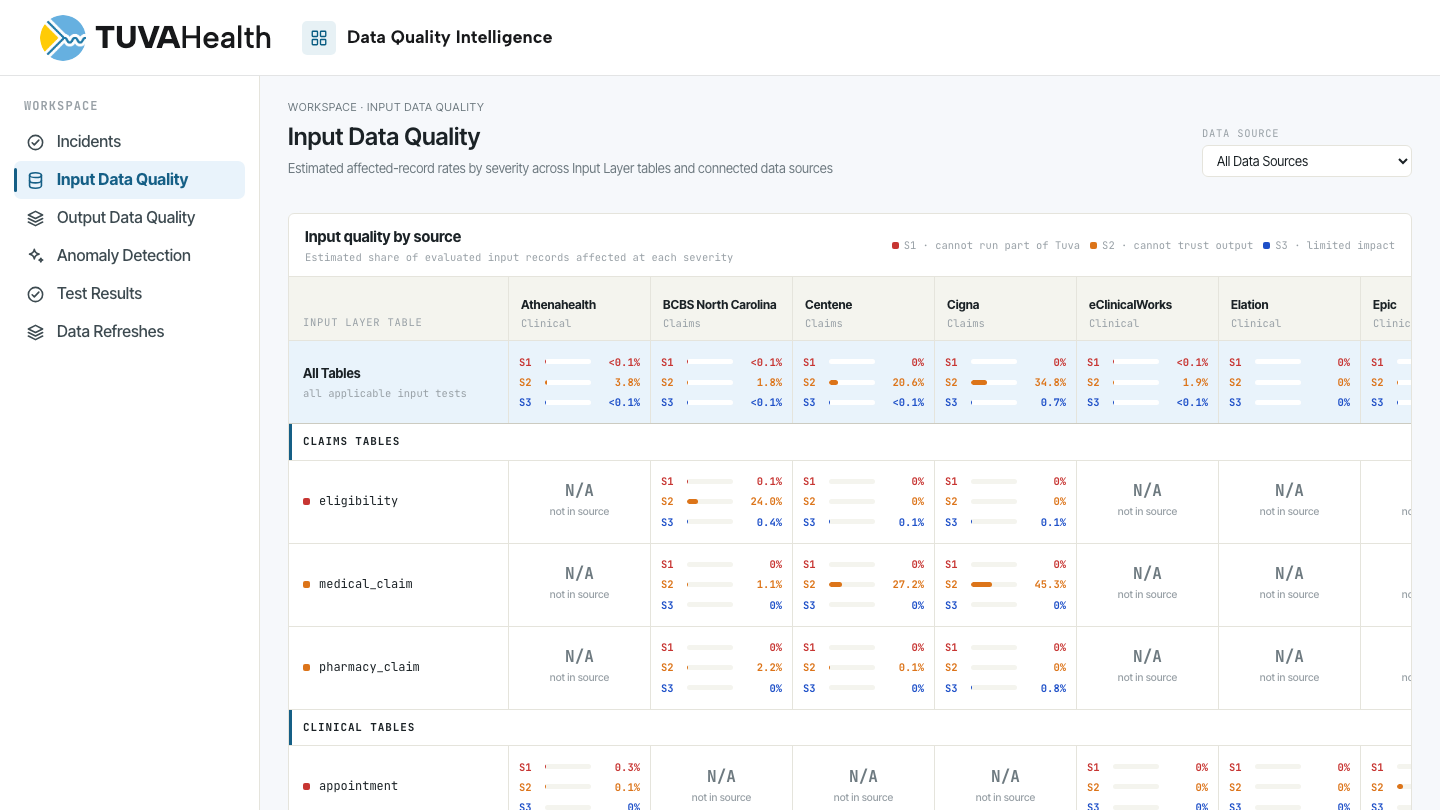
Continue with Structural Data Quality, Logical Data Quality, the Data Quality Test Catalog, or the Data Quality Tutorial. For more information or a demonstration of Tuva Enterprise Data Quality Intelligence, connect with the Tuva team below.
Explore Tuva Enterprise Data Quality Intelligence. Schedule time with the Tuva team →