Customizing the Tuva Data Model

Rabee Zyoud is the founder of SnowQuery, a healthcare data engineering and architecture consultancy. He has implemented Tuva for nearly 10 healthcare and life sciences organizations. For questions, implementation assistance, or consulting inquiries, contact hello@snowquery.com.
Intro
Across most Tuva implementations I’ve worked on, teams need to carry organization-specific fields through the model. Common examples include care navigation ownership, payer-specific identifiers, and authorization metadata. Before v0.17.0, these fields often get dropped in core staging models because many models use explicit column lists.
With v0.17.0, Tuva introduces native extension-column pass-through support. Using a standard prefix convention (default: x_) and a reusable macro, host projects can add custom columns once and keep them available throughout Tuva core outputs.
The Problem
Healthcare organizations frequently need custom columns alongside Tuva’s standardized models:
| Model | Example Extension Columns |
|---|---|
patient |
x_care_navigator, x_salesforce_id |
eligibility |
x_member_tier |
medical_claim |
x_authorization_number, x_referral_id |
encounter |
x_department_name |
Without pass-through support, those fields are preserved in input_layer but dropped in downstream core models that use explicit selections. Teams then have to maintain extra joins and rematerialize data downstream.
Typical impact:
- More custom SQL in host projects
- More tables/views to manage
- Higher maintenance and compute costs
- Slower downstream pipelines
In this post, I walk through:
- The pass-through pattern introduced in v0.17.0
- A before/after model example
- The
select_extension_columnsmacro - A practical adoption checklist
What v0.17.0 Introduces
Tuva now supports extension-column pass-through driven by two variables:
vars:
  passthrough:
    prefix: 'x_'    # Prefix that marks extension columns
strip: false # If true, remove prefix in final output aliases| Variable | Default | Description |
|---|---|---|
passthrough.prefix |
'x_' |
Prefix used to identify extension columns |
passthrough.strip |
false |
Whether to strip prefix in final core model output |
Data Flow
- Host models publish standard Tuva columns plus extension columns (for example,
x_*). input_layer__*models still useSELECT *, so all fields are preserved.- Core staging/final models call
select_extension_columns(...)to append extension columns dynamically.
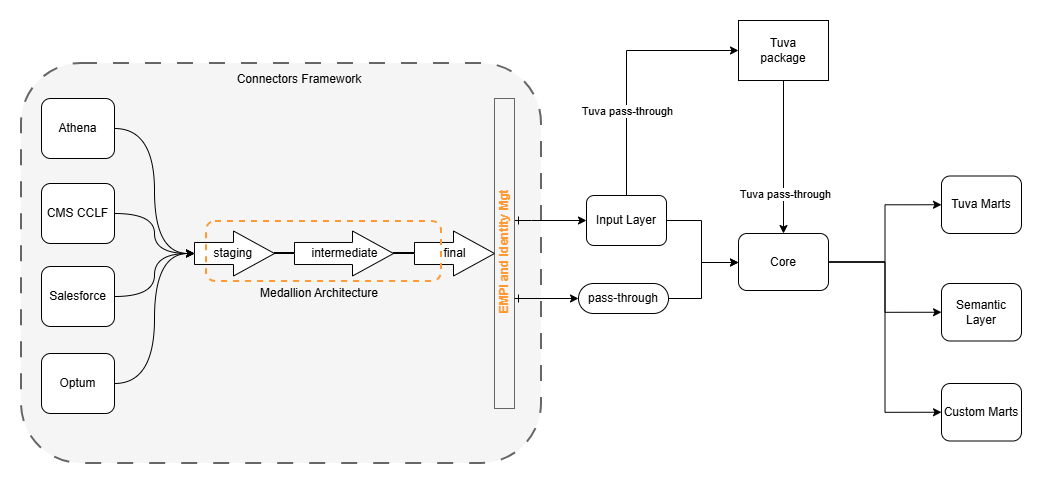
How the Pattern Works
Core models are organized into column groups so extension behavior is explicit and reusable:
{%- set tuva_core_columns -%}
    -- Tuva standard columns
{%- endset -%}

{%- set tuva_extension_columns -%}
    {{ select_extension_columns(ref('input_layer__patient'), strip_prefix=false) }}
{%- endset -%}

{%- set tuva_metadata_columns -%}
    , data_source
    , tuva_last_run
{%- endset -%}

select
    {{ tuva_core_columns }}
    {{ tuva_extension_columns }}
    {{ tuva_metadata_columns }}
from ...
This keeps model SQL readable and ensures extension columns are not lost.
Before and After Example
Before (core__stg_clinical_patient.sql)
Extension columns from input_layer__patient are not selected.
select
      cast(person_id as {{ dbt.type_string() }}) as person_id
    , cast(first_name as {{ dbt.type_string() }}) as first_name
    -- explicit Tuva column list only
    , cast(data_source as {{ dbt.type_string() }}) as data_source
    , tuva_last_run_datetime as tuva_last_run
from {{ ref('input_layer__patient') }}
cross join tuva_last_run
After (core__stg_clinical_patient.sql)
Extension columns are appended via macro.
{%- set tuva_core_columns -%}
    cast(person_id as {{ dbt.type_string() }}) as person_id,
    cast(first_name as {{ dbt.type_string() }}) as first_name,
    cast(data_source as {{ dbt.type_string() }}) as data_source
{%- endset -%}

{%- set tuva_extension_columns -%}
    {{ select_extension_columns(ref('input_layer__patient'), strip_prefix=false) }}
{%- endset -%}

{%- set tuva_metadata_columns -%}
    , tuva_last_run_datetime as tuva_last_run
{%- endset -%}

select
    {{ tuva_core_columns }}
    {{ tuva_extension_columns }}
    {{ tuva_metadata_columns }}
from {{ ref('input_layer__patient') }}
cross join tuva_last_run
This change in model structure is the key: standard columns stay explicit, while custom extension fields are appended dynamically.
Host Project Usage Example
A host patient model can publish extension fields using the configured prefix:
select
      person_id
    , patient_id
    , first_name
    , last_name
    , birth_date
    , sex
    , race
    , care_navigator as x_care_navigator
    , salesforce_id as x_salesforce_id
    , risk_score as x_risk_score
    , primary_language as x_primary_language
    , data_source
from {{ source('source_input', 'patient') }}
In core__patient, you get:
- All standard Tuva columns
x_care_navigator(orcare_navigatorwhenpassthrough.strip: true)x_salesforce_id(orsalesforce_idwhenpassthrough.strip: true)x_risk_score(orrisk_scorewhenpassthrough.strip: true)x_primary_language(orprimary_languagewhenpassthrough.strip: true)
The Macro
Location: macros/core/select_extension_columns.sql
Purpose:
- Detect columns by prefix from a relation using
adapter.get_columns_in_relation - Optionally qualify with alias
- Optionally strip prefix in output aliasing
- Return SQL-ready select expressions with leading commas
Core matching logic:
{%- for col in source_columns -%}
    {%- if col.name.lower().startswith(effective_prefix.lower()) -%}
        {%- set stripped_name = col.name[effective_prefix | length:] -%}
        {%- if effective_strip_prefix -%}
            {%- set col_expr = alias_prefix ~ col.name ~ ' as ' ~ stripped_name -%}
        {%- else -%}
            {%- set col_expr = alias_prefix ~ col.name -%}
        {%- endif -%}
        {%- do extension_columns.append(col_expr) -%}
    {%- endif -%}
{%- endfor -%}
Full macro code
{% macro select_extension_columns(relation, alias=none, prefix=none, strip_prefix=none) %}
    {%- if not execute -%}
        {{ return('') }}
    {%- endif -%}

    {%- set passthrough_config = var('passthrough', {}) -%}
    {%- set effective_prefix = prefix if prefix is not none else passthrough_config.get('prefix', 'x_') -%}
    {%- set effective_strip_prefix = strip_prefix if strip_prefix is not none else passthrough_config.get('strip', false) -%}

    {%- set source_columns = adapter.get_columns_in_relation(relation) -%}
    {%- if source_columns | length == 0 -%}
        {{ return('') }}
    {%- endif -%}

    {%- set alias_prefix = alias ~ '.' if alias else '' -%}
    {%- set extension_columns = [] -%}

    {%- for col in source_columns -%}
        {%- if col.name.lower().startswith(effective_prefix.lower()) -%}
            {%- set stripped_name = col.name[effective_prefix | length:] -%}
            {%- if effective_strip_prefix -%}
                {%- set col_expr = alias_prefix ~ col.name ~ ' as ' ~ stripped_name -%}
            {%- else -%}
                {%- set col_expr = alias_prefix ~ col.name -%}
            {%- endif -%}
            {%- do extension_columns.append(col_expr) -%}
        {%- endif -%}
    {%- endfor -%}

    {%- if extension_columns | length > 0 -%}
        {%- for col_expr in extension_columns %}
    , {{ col_expr }}
        {%- endfor -%}
    {%- endif -%}
{% endmacro %}
Macro Parameters
| Parameter | Default | Description |
|---|---|---|
relation |
required | Relation to inspect for extension columns |
alias |
none |
Optional table alias for column references |
prefix |
var('passthrough').get('prefix', 'x_') |
Prefix that identifies extension columns |
strip_prefix |
var('passthrough').get('strip', false) |
Remove prefix in output alias |
Macro Usage Examples
Keep prefix:
{{ select_extension_columns(ref('input_layer__patient'), strip_prefix=false) }}With alias:
{{ select_extension_columns(ref('input_layer__medical_claim'), alias='claim', strip_prefix=false) }}Use global strip configuration:
{{ select_extension_columns(ref('input_layer__patient')) }}Other Details
Naming Convention
| Prefix | Meaning |
|---|---|
x_ |
Extension column passed through Tuva core models |
Why this default works well:
- Short and easy to scan
- Clear distinction from standard Tuva columns
- Low risk of naming collision
- Optional removal in outputs via
passthrough.strip
Implementation Scope in Tuva
The v0.17.0 release applies this pattern across macros and core models, including:
| Area | Example Files |
|---|---|
| Macros | macros/core/select_extension_columns.sql, macros/core/smart_union.sql |
| Staging models | core__stg_clinical_patient.sql, core__stg_claims_medical_claim.sql, core__stg_clinical_eligibility.sql |
| Final models | core__condition.sql, core__procedure.sql, core__medication.sql, core__lab_result.sql, core__observation.sql |
Adoption Checklist
- Add extension fields in host input models with the configured prefix (default
x_). - Set
vars.passthrough.prefixand optionalvars.passthrough.stripindbt_project.yml. - Confirm core models use
select_extension_columns(...)where explicit column lists are present. - Run model builds and validate expected extension columns in core outputs.
Closing
This pattern lets teams preserve organization-specific fields without forking Tuva or maintaining heavy downstream rejoin logic. The result is cleaner host projects, less duplicate SQL, and more reusable Tuva outputs for marts and analytics.